🚀 Beta Community available (SOFTWARE) – Pro hardware is NOT available yet

The only macro pad that works
without software. Plug it anywhere.

El único macro pad que funciona
sin software. Conéctalo en cualquier equipo.

Native HID mode — acts as a real keyboard, mouse, or MIDI on any device. No drivers. No app. No limits.

Build your free macro pad with Arduino today. Soon, unlock Cosmic Pad Pro: dedicated hardware for ultimate control.

⚠️ Community Beta works with Arduino and requires the software open. Cosmic Pad Pro (standalone HID) — Expected Q3 2026.

Active development — latest updates focused on Pro (April 2026)

What does Cosmic Deck Software do?

Cosmic Deck software connects your physical pad with unlimited desktop macros.

Instant connection

Auto-detects and connects your device.

Visual Macro Editor

Assign shortcuts, apps, text, and media actions.

Real-time feedback

Real-time button presses on your screen.

What can you do TODAY?

Start your maker journey in minutes!

1️⃣
Download Cosmic Deck
Free Windows software
2️⃣
Connect Arduino
Uno, Nano, or Mega
3️⃣
Set up 3 profiles
Each with 9 buttons
4️⃣
Assign macros
Shortcuts, apps, text
5️⃣
Use it for free!
While you wait for Pro

What does "Hybrid Ecosystem" mean?

Community (Available)

Turn an Arduino into your macro-pad. Requires PC turned on and software open.

Pro (Expected Q3 2026)

Proprietary RP2040 hardware that works with software for advanced PC features, and without software— acts as a keyboard, mouse, or MIDI anywhere.

Everything you can do today

Pro Macro Editor

Create complex sequences with delays, open apps, type text, and run commands.

Visual Mini-Grid

Visual feedback on screen – see which button you press in real-time.

Total Control

Media control, volume, screenshots, key combos, automatic text, and more.

Which version is for you?

Choose your path: free DIY or professional hardware (coming soon).

FREE
For Arduino

Community

Ideal for learning, makers, and the curious.

$0 Free Software

Requires PC on and software open.

  • Arduino Uno, Nano, Mega
  • 3 Configurable profiles
  • 3 Spaces (3x3 Grid)
  • Macro Editor with Delays
  • Visual Mini-Grid
  • No HID Mode
  • No App Plugins
Try with my Arduino
COMING SOON
Dedicated hardware

Pro Edition

For streamers and professionals.

Early bird pricing — join waitlist

Not available for sale yet – waitlist only.

  • Unlimited profiles
  • 5 spaces per profile
  • Standalone HID mode
  • OBS/Spotify plugin store
  • Software auto-detection
  • RP2040 pins for modules
  • Procesador RP2040

The power of the RP2040 in your hands

The Pro version is not just a macro-pad, it's a modular brain.

Modular Expansion

Connect screens, sensors, encoders, and magnetic matrices.

Total Independence

Works without drivers on Windows, Mac, Linux, and tablets.

Real prototype of the Cosmic Pad Pro in development
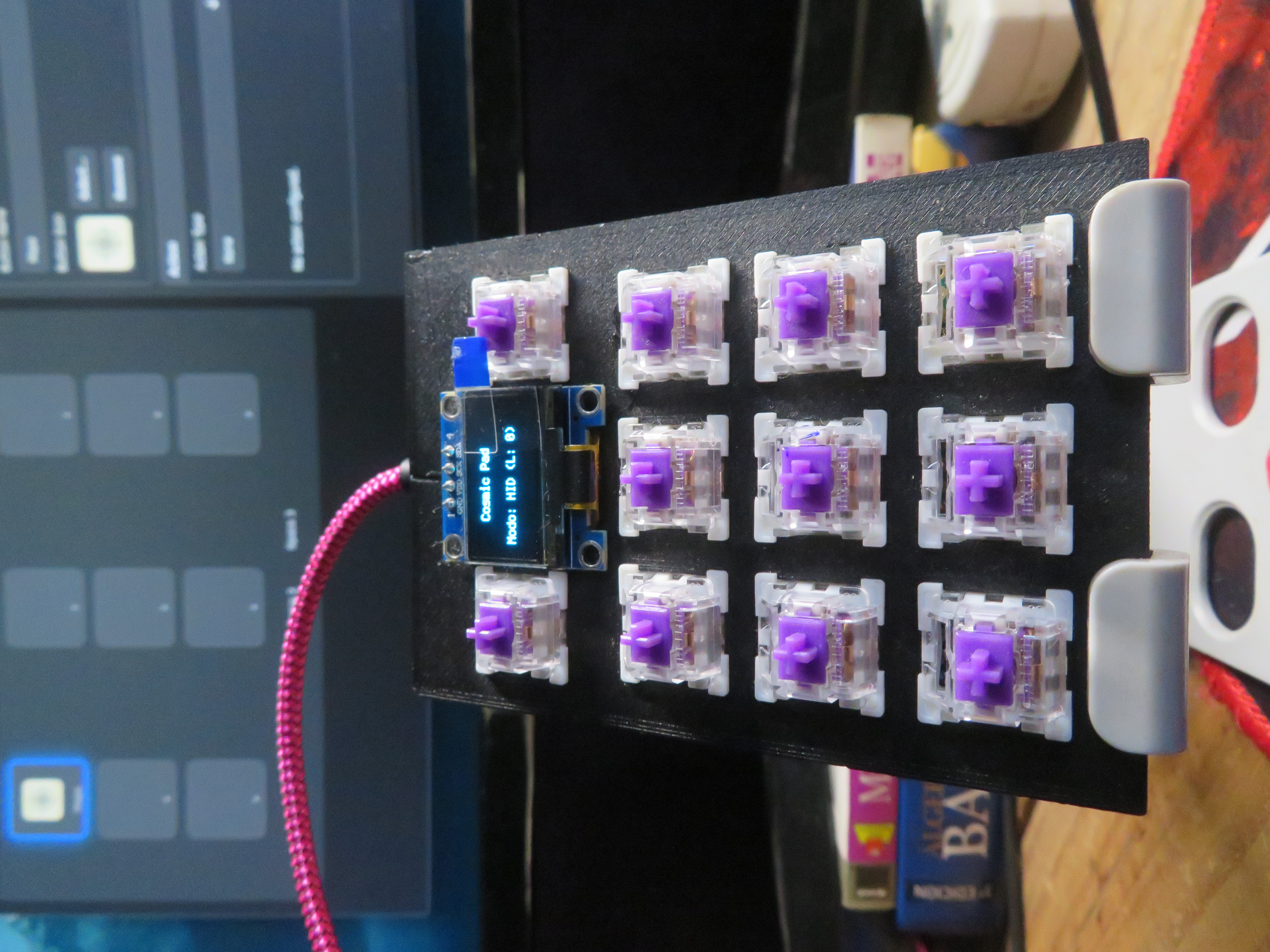
Prototipo Cosmic Pad Pro

Intelligent Hardware

HID keyboard ✓ — HID mouse ✓ — HID gamepad ✓ — MIDI in progress
Download Beta v1 (Windows)

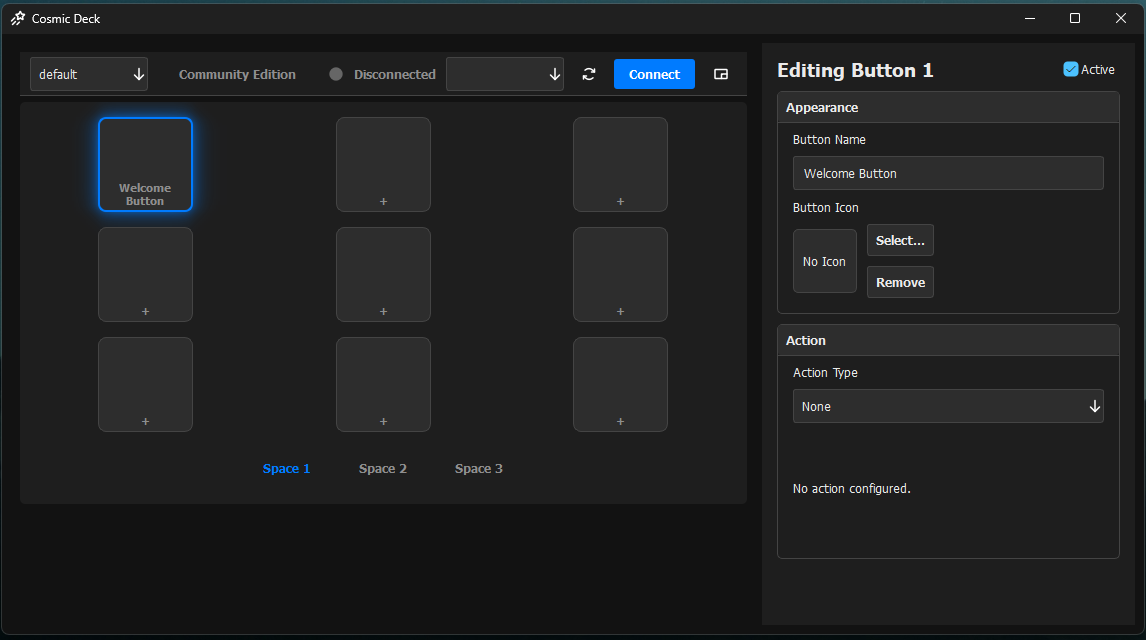
Bring your Arduino to life and automate your workflow in minutes. Totally free!

Interfaz Cosmic Deck Community Edition
3 Profiles Grid 3x3 Macro Editor Mini-Grid UI
Download for Windows
🛡️ Windows download tip
Cosmic Deck is a new project, so this beta installer is not code-signed yet.
Windows may show an extra verification step on first download, which is expected for new apps.
To continue, click "Keep" in your browser, then open the file and choose "More info → Run anyway".
Arduino connection guide

Requires Arduino Uno, Nano, or Mega.

Be the first to get the Pro

Get early bird access and exclusive presale pricing.
Pro hardware expected Q3 2026. Not available for purchase yet.